How to Avoid Running AI Slop
The models aren't dumb, you are just bad at providing context and prompting, but you can easily fix both.
You’ve tried using Claude or ChatGPT to create a running plan to get faster, to PR your next race. At first glance, it looks awesome and you are blown away by how quickly it created something perfect for you. But then you get into the plan and you’re running your easy runs too hard, your intervals aren’t stacked correctly, or you might even get injured. That beautiful plan you thought you had turns out to be just ai slop masked in running form. What happened? It looked perfect on paper.
The Lead
This is a scenario I hear about all the time and it’s something I’ve spent a great deal of time trying to figure out a solution to. It turns out the answer is quite simple, and it’s two parts:
FIRST: You need to give these chatbots your historical context. This goes for anything you do with these systems. Without historical context on who you are or what your goals are, these systems will create elaborate plans that aren’t actually grounded in your life. This can be done in 1 of 2 ways:
You connect in your actual data to the system through one of two pathways, either an MCP or API.
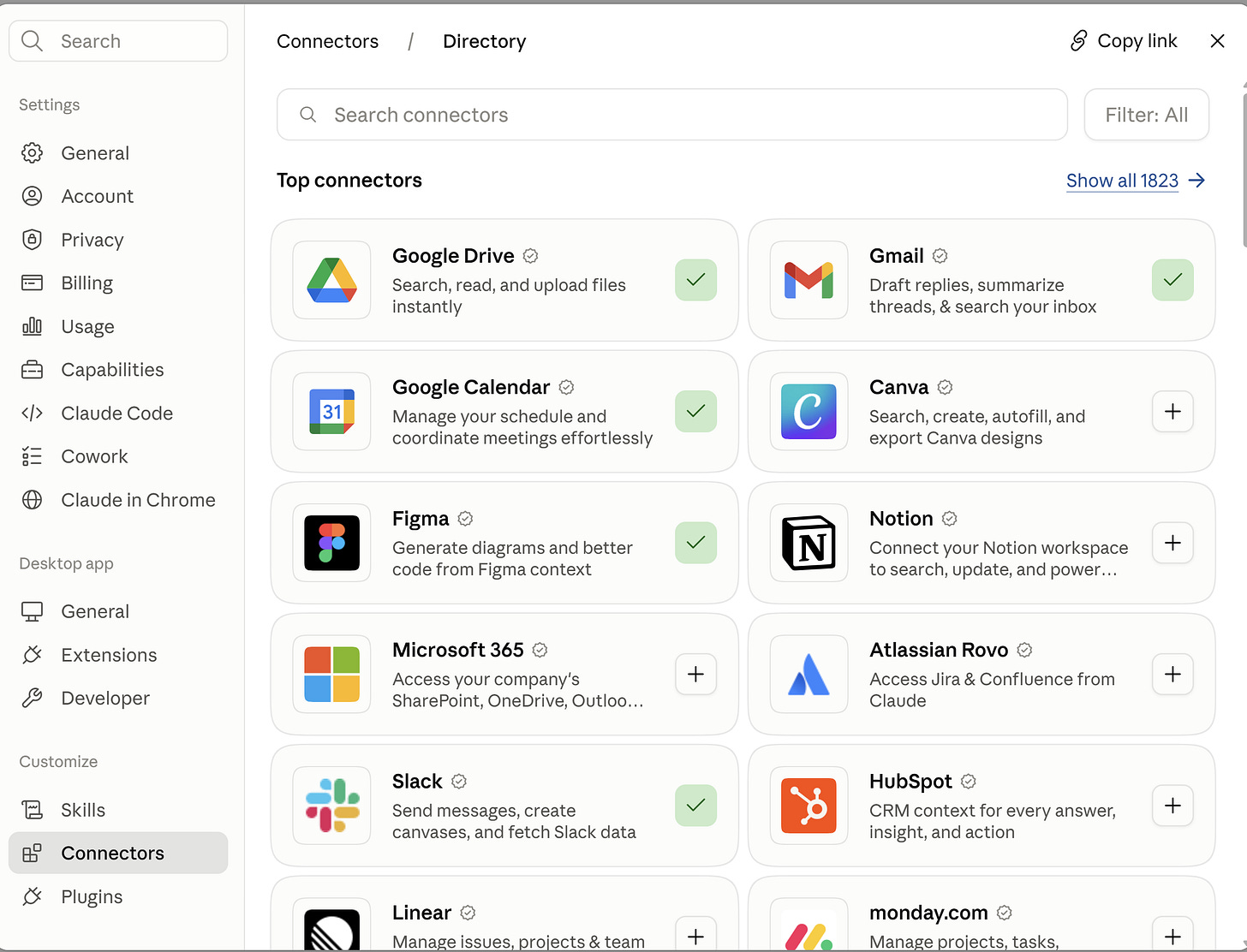
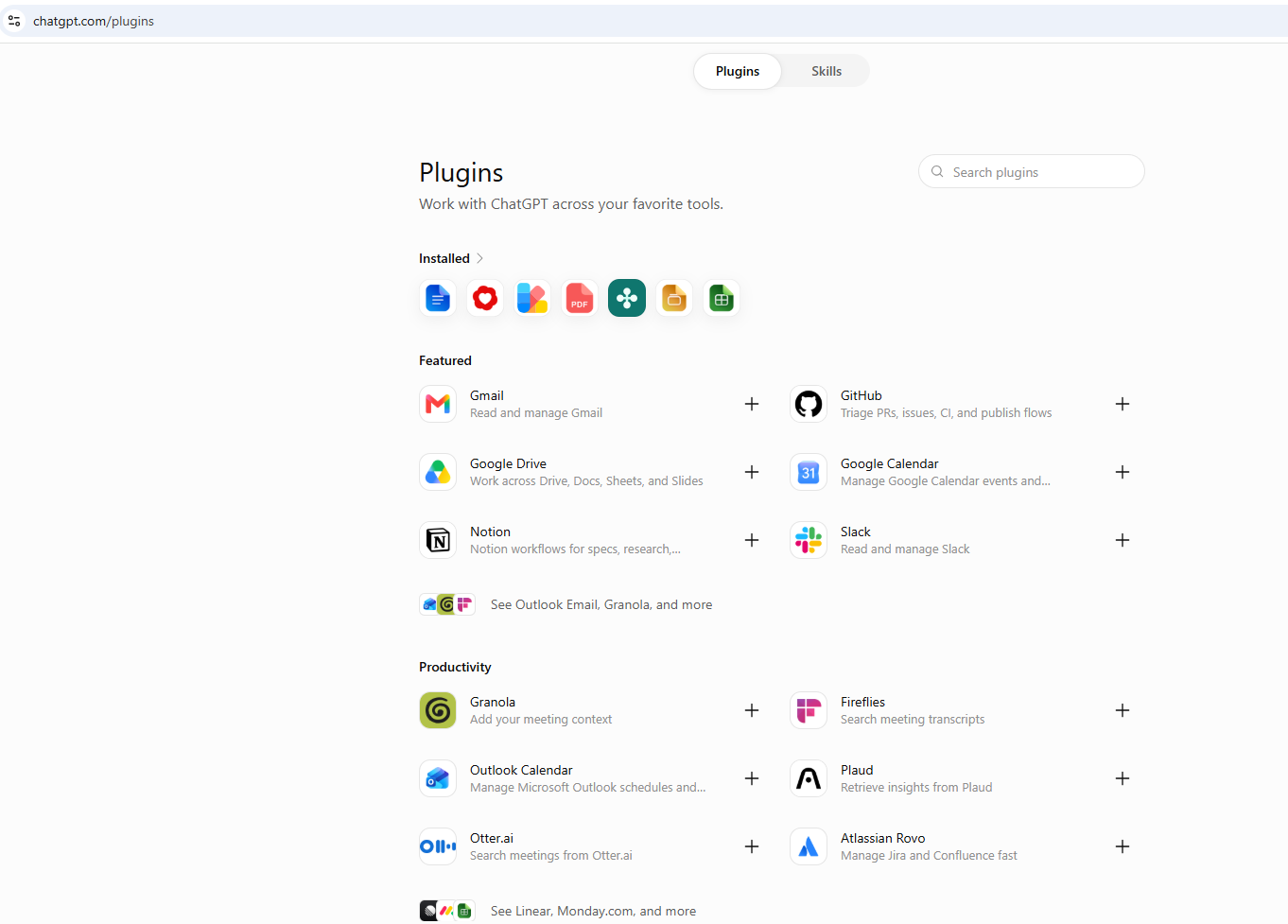
An MCP (model context protocol) is the simplest solution and this is the easiest path for most every day users. Think of an MCP as a veteran at your company. They understand the full context of everything happening and can give you a really accurate answer on where to find the data. Where is my health information, where are my recent runs, what’s my recovery score, everything. You can connect to an MCP easily using Claude and ChatGPT’s connectors and plugins features. Once you are connected, now you can ask your chatbot any question about your data and it will have the full context to answer.
For Claude → Navigate to settings → Connectors → Add (top right) → browse connectors → then just search for whatever you want to connect → sign in and you’re golden
For ChatGPT → Navigate to settings → Plug Ins → Browse Plugins (scroll down) → then just search for whatever you want to connect
An API is what sits under most MCPs. This is a direct connection to each of the “data points” (pace, heart rate, time, etc.). Your API will give you access to your recent runs and your health data, but you have to know what’s there and what to actually ask. While more and more companies are releasing MCPs to allow their users to easily access their own data, not all of them have released public connections yet (cough, cough, Strava). If the company you want access to doesn’t have an MCP then you will need to connect in via API. Some companies allow public access to their API and others restrict it to developers or enterprise accounts.
If you are searching for whether your company has a public API, a simple google search or a prompt to your chatbot asking “does company XYZ have a public API and if so, please pull the API documentation” will reveal the answer. If it does then the next step for you would be to head over to one of the agentic coding platforms (Claude Code or Codex) and then point the model at the API and ask it to walk you through the connection. I won’t go overly detailed here on this, but if you want to learn we have a free course here that walks you through all the basics step by step.
SECOND: You need to learn how to actually prompt these chatbots. Some people call this prompt engineering, but really it’s critical thinking. You need to understand how to give these chatbots specific instructions with goals and guardrails. One of the techniques I use for prompting is something called SCURPE (Statement, Context, Understanding, Research, Plan, Execute). Best way to explain is through a simple research example:
Pick any question or topic you want to learn about, maybe it’s “How do I increase my VO2 max?”
Instead of starting the conversation by saying something like:
“build me a plan to increase my VO2 max”,
a SCURPE approach would be something like:
“I am a fairly new runner and want to create a plan to increase my vo2 max. Before you do anything, I want you to review my historical Garmin data so you understand my baseline. Then, interview me to understand my timeline, goals and training philosophy. Once you have the context on who I am, my data and what I want to do, then go find current, leading literature on the topic. Summarize your findings and present them to me. I want to understand sample size and where you think the data might be short. If there are multiple sources that contradict each other then I want to know that and I want your recommendation on which you think is best and why. Once we have decided that the research is relevant and timely, then let’s create a plan for me. Once the plan is finalized, then we can execute”
Obviously the second example is a bit more detailed, but if you notice it has each of the key points:
Statement - what is the exact thing you want “I am a fairly new runner and want to create a plan to increase my vo2 max.”
Context - force the model to ground itself in your actual data “review my historical Garmin data”
Understanding - based on my context what are my actual goals “interview me to understand”
Research - Based on my context and your understanding of my goals, now go find relevant research “Once you have the context on who I am, my data and what I want to do, then go find current, leading literature on the topic.”
Plan - Now that we have researched properly, let’s plan together how to meet my goals “then let’s create a plan for me”
Execute - Only after we have done all of the above can we execute “once the plan is finalized, then we can execute”
If you follow the SCURPE methodology, I guarantee your responses from the model will be infinitely better. Now each part of SCURPE won’t be needed each time and you can decide what is relevant when, but if you are building any plan then I highly recommend following this prompting method.
To take this a step further, if you are using Claude Code or Codex, then you can flip the model into “Plan” mode which will force the model to do a lot of what we just went through and come back to you with a written Plan before it acts on anything.
Prediction: in the next 6 months, every major “app” company will have released an MCP allowing users to connect to their own data. I spoke about the democratization of apps in previous posts, and this will be the first step in that direction. Once you are able to “connect” to every app via Claude or ChatGPT, then is there even a reason to go into that individual app anymore? Why wouldn’t you just build your own life dashboard that connects into all your relevant apps and looks and feels how you want? This is what you have to prepare for. This is what will be exciting.
What’s Hot Around the Industry
I spent a bit more time on the lead concept today, and there wasn’t a ton of breaking news, so I will keep this section fairly brief and hit on the key ones:
Wahoo split its app into 3 tiers on Tuesday
Base: stays free with compatible Wahoo hardware and covers pairing, activity sync, route planning, and live tracking
Core: new at $4.99 a month, holds training insights, performance analytics, training load, and fitness tracking. Also includes a new running metric, 3DP (three-dimensional pace), which creates a profile of your Threshold Pace, Maximal Aerobic Pace and Anaerobic Capacity.
Pro: $17.99 a month, adds the full SYSTM library and structured plans.
KR Take: This is a great example of another company demonstrating how valuable data insights are. All of their deep data insights are behind their new 3 tiered paywall. Wahoo does have an API that is request access only, but does not appear to have a paywall in front of it. So if you wanted to get your Wahoo data and didn’t want to pay for their monthly plan, you could connect directly in and build everything yourself.
Google Pixel Watch 5 released
Google dropped their new watch with advanced health analytics and a strength training program planner. The health analytics are anchored through their Google Health Coach and feature new blood pressure and insulin resistance trends.
KR Take: They spent some of their released article comparing this watch to Garmin’s Fenix 8 Pro, and if Google thinks this is a Garmin flagship killer, they’re sadly mistaken. I think this is the perfect watch for a beginner runner who wants a smart watch that looks really slick or for someone who is primarily interested in strength training and doesn’t want to spend $1,200 on a Garmin watch. But for them to compare this to the Fenix 8 Pro is kind of comical because it’s like comparing the Yankees to the Trenton Thunder AA team.
Let’s Get Technical
Anthropic is watermarking everything Claude writes
The days of easily copying and pasting from Claude and pretending it’s your own are gone. Every written line of text out of any Claude system will now contain a watermark embedded directly into the generated text and code by shifting probability distributions during generation, meaning it cannot be toggled off. There is already a new Github repo that claims to remove the watermark. It was published 3 days ago and already has 7.5k stars. Worth a run through if you use Claude for written text generation.
Grok shipped Grok Bot
A multi-agent system that is a direct build to compete with OpenClaw and Hermes. It starts at $200 a month but claims to be pretty powerful. One of the health focused use cases I have seen so far is from Kallaway, who created a health operating system for his entire family. Every one of his family members’ health data is tracked and monitored by a team of agents. If you are okay spending a couple hundred bucks to learn how to manage a team of agents, then I think it’s worth a run through.
Let’s Wrap it Up
Every topic and story today revolves around one continued major theme, learning how to use these systems effectively. This is an invaluable skill and something I believe any person reading this should learn. Our free Skool community grows daily and is one of the quickest ways to learn these skills in a way that is friendly and relevant. Come join the hundreds of other athletes learning how to build with their own data.
Looking forward to seeing you in there!
Kevin
Train with your own data. Build your own AI coach.
Athlete AI helps athletes and coaches take control of their training with AI. No code required. Join the free community for the 7-Day Challenge and the full classroom, or get the news in your inbox every week.
READY TO BUILD YOUR OWN APP OR AI AGENT? SEE ATHLETE AI LABS →